

Outgoing Mail (SMTP)
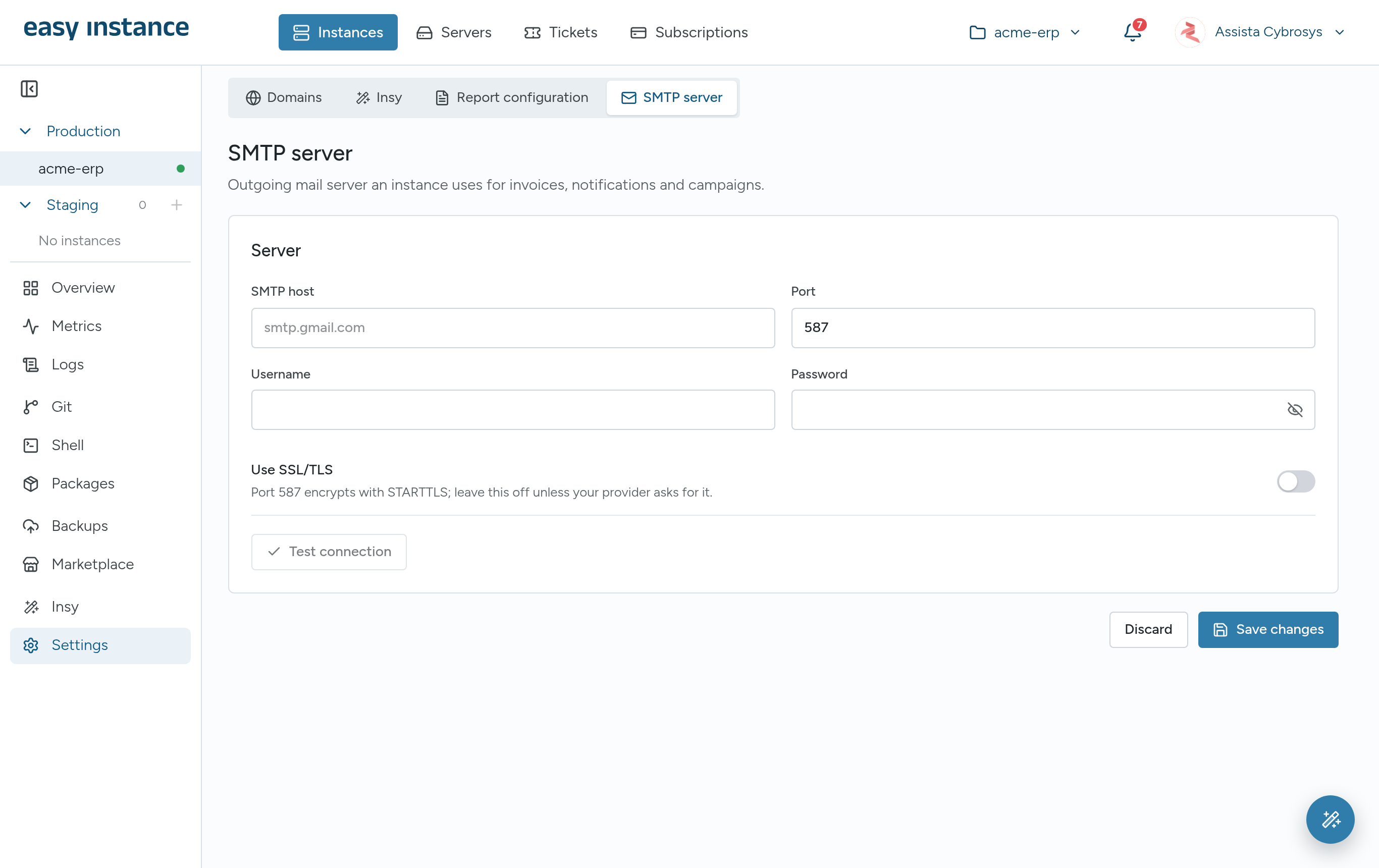
The SMTP server is the server that sends your Odoo emails, such as invoices, notifications and campaigns. Your email provider gives you its details. You can set it in step 4 of the new instance wizard, or at any time in Settings.
- Open the instance and select Settings, then SMTP server.
- Enter the SMTP host, for example
smtp.gmail.com. - Enter the Port. 587 is the default.
- Enter the Username and Password.
- If you're unsure, keep port 587 and leave Use SSL/TLS off. Turn it on only if your provider tells you to use port 465.
- Select Test connection. It signs in to the mail server; no email is sent.
- Select Save changes.
| Provider | SMTP host | Port |
|---|---|---|
| Gmail / Google Workspace | smtp.gmail.com | 587 |
| Microsoft 365 / Outlook | smtp.office365.com | 587 |
| Zoho Mail | smtp.zoho.com | 587 |
Gmail and Microsoft 365
These providers usually need an app password rather than your normal password. Create one in your Google or Microsoft account security settings.